Decidi tu quali metodi di pagamento vede chi compra.
HideFlow nasconde, rinomina e riordina i metodi di pagamento del tuo checkout Shopify. Crei una regola in un minuto, la provi nel simulatore e la attivi solo quando sei convinto.
4$
Al mese, fatturati da Shopify
7
Giorni di prova gratuita
3
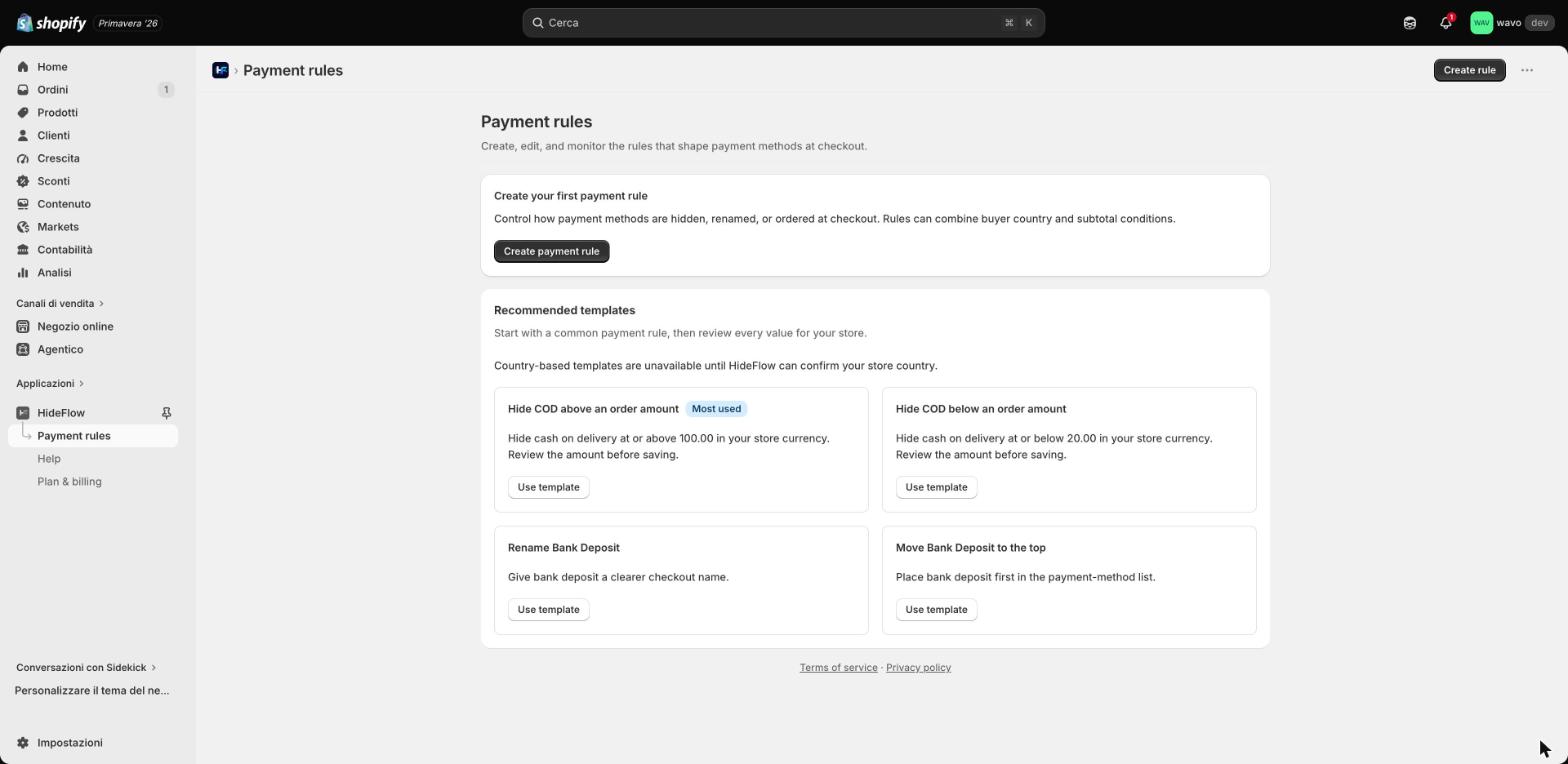
Azioni: nascondi, rinomina, riordina
52
Condizioni di checkout disponibili
01
Regole che capiscono il tuo checkout
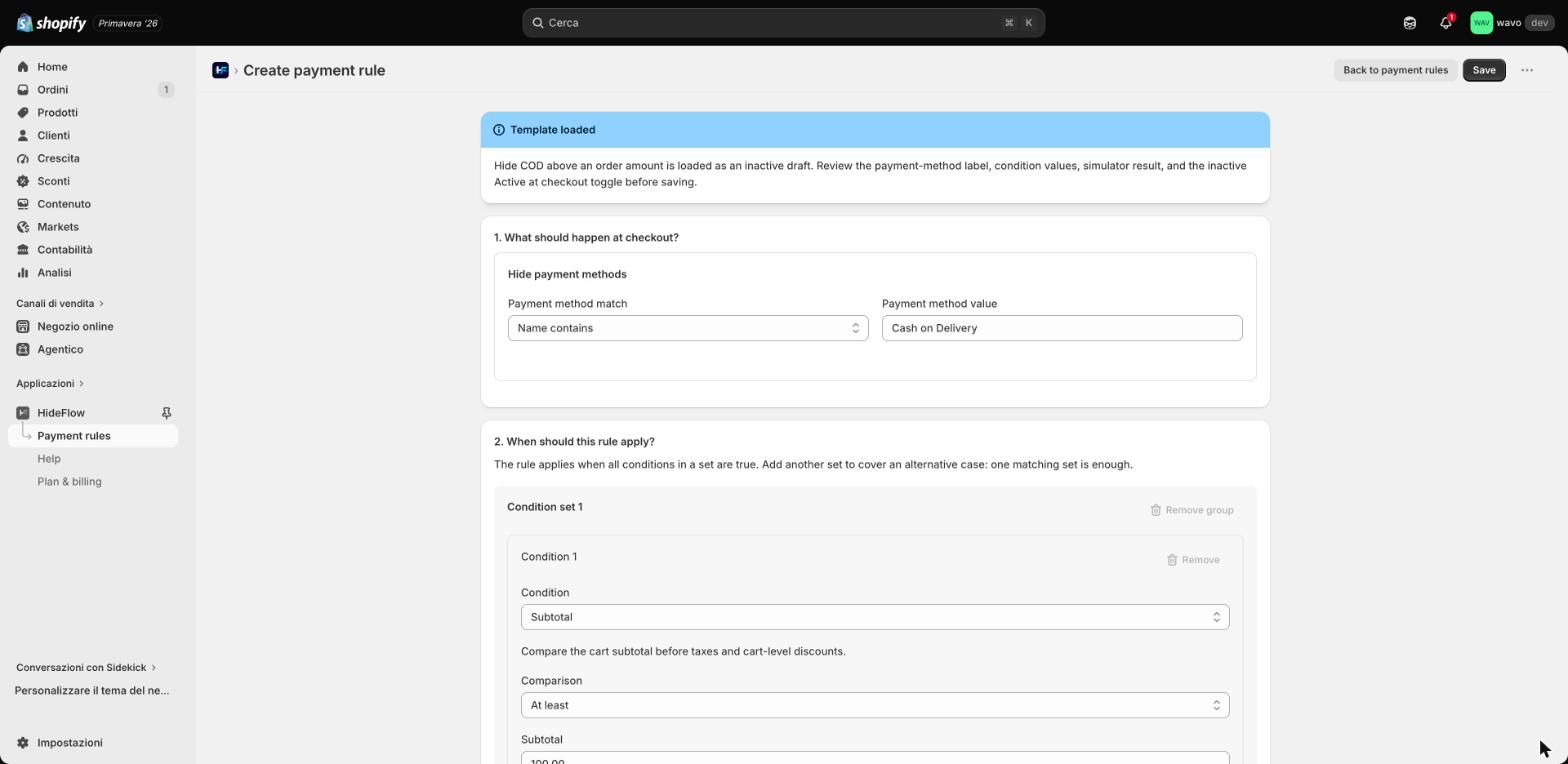
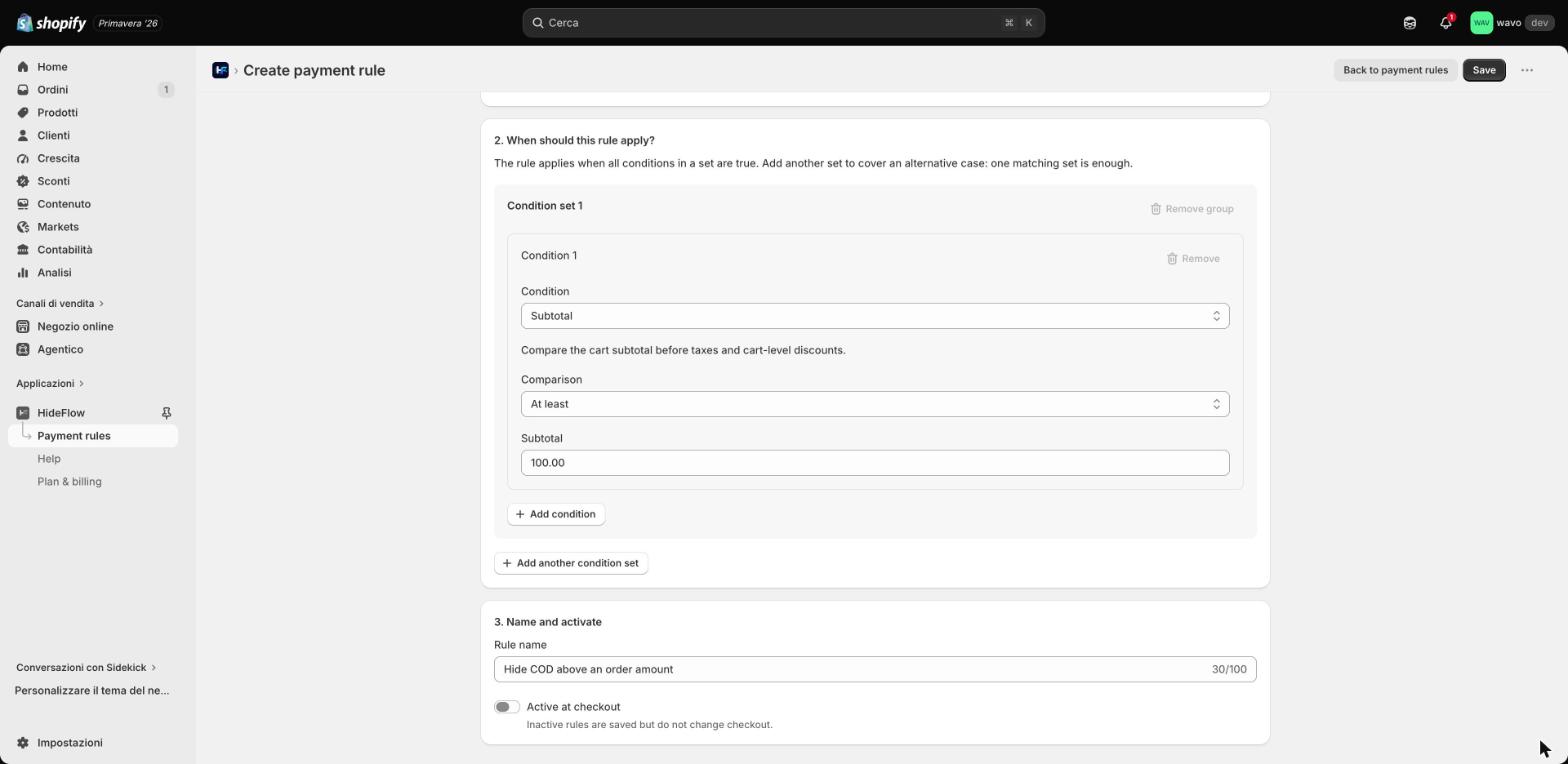
Paese dell'acquirente, subtotale, totale, quantità, città, provincia, CAP, azienda, presenza del telefono, metodo e tipo di spedizione. Combina più condizioni in un set, aggiungi un secondo set per il caso alternativo.
02
Simula prima di attivare
Inserisci i dati di un checkout reale e i metodi di pagamento che il cliente vedrebbe: il simulatore mostra quali condizioni sono soddisfatte e quali operazioni verrebbero applicate. Le regole restano inattive finché non decidi tu.
03
Sincronizzazione Shopify sempre visibile
Bozza, in sincronizzazione, sincronizzata, azione richiesta: ogni regola dichiara il proprio stato rispetto a Shopify, con errori leggibili e ritentativo manuale quando serve. Niente regole fantasma al checkout.
04
Checkout insights, opzionali
Attivali se vuoi vedere quanti checkout e quanti ordini passano mentre le regole sono attive. Sono facoltativi, dipendono dal consenso dell'acquirente e non raccolgono dati personali dei clienti. Le regole funzionano anche senza.
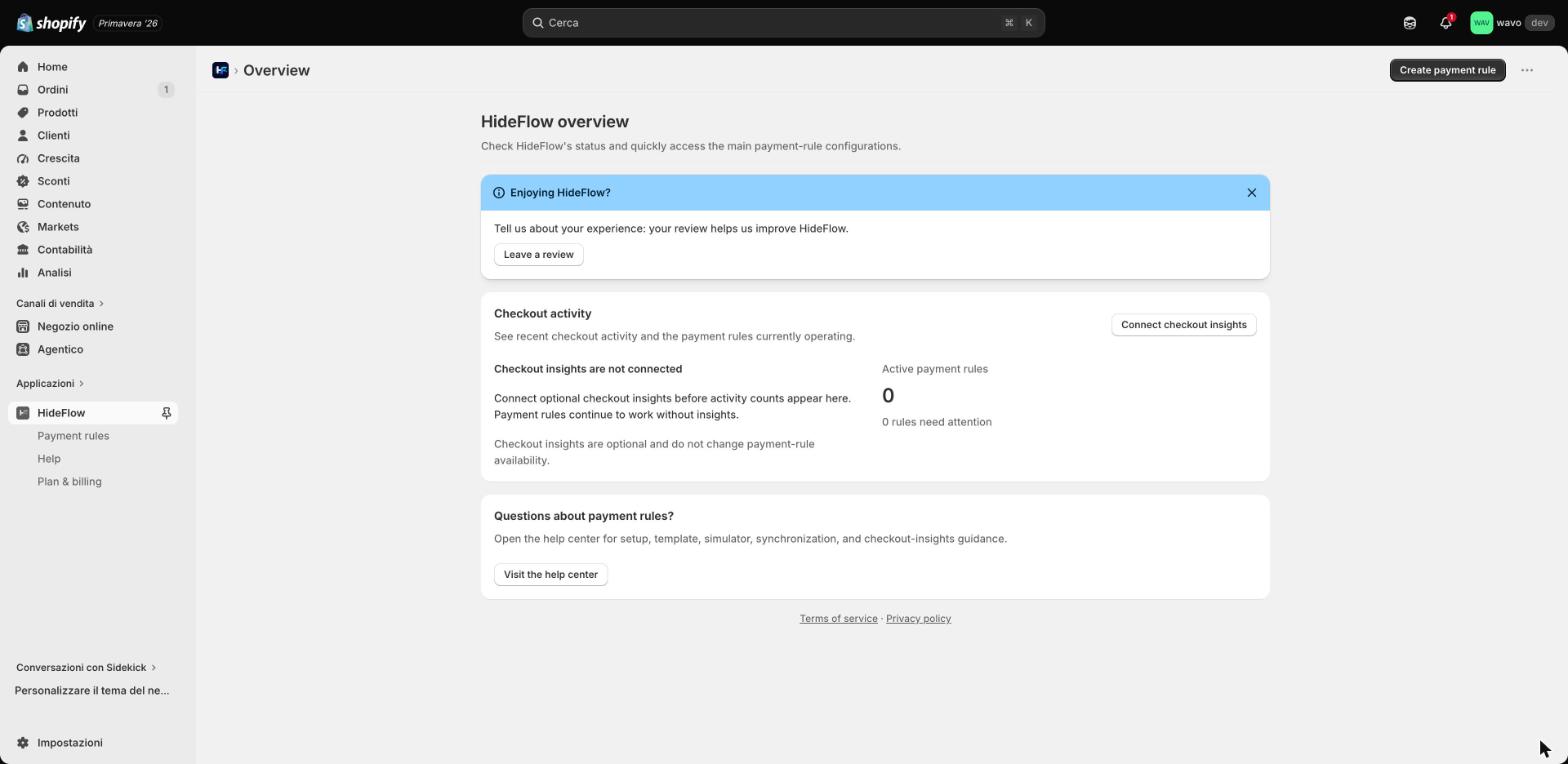
Tutto quello che ti serve in una schermata
Stato dell'app, guida al setup, regole attive e attività del checkout: tutto in una sola schermata dentro l'admin Shopify.
Descrivi la regola a parole. L'assistente la prepara.
Nella pagina Assistente AI scrivi quello che ti serve con parole tue. L'assistente legge le regole e i metodi del tuo negozio, simula il checkout e ti propone la regola pronta. Nulla cambia finché non premi Applica.
- Crea, modifica, elimina, attiva e disattiva regole di pagamento e di consegna, o riprova una sincronizzazione
- Ogni proposta è una scheda in parole semplici: la salvi tu, con un clic su Applica
- Risponde in italiano o in inglese
- Fino a 20 messaggi ogni 10 minuti e 60 al giorno per negozio
Per esempio
«Nascondi il contrassegno sopra i 100€»
«Nascondi il bonifico a chi compra fuori dall'Italia»
«Quali regole di consegna ho attive? Riprova quella in errore»
Se manca un dettaglio, come l'importo o il nome esatto del metodo che vedi al checkout, l'assistente te lo chiede prima di proporre.
L'assistente cambia il mio checkout da solo?
No. L'assistente prepara solo proposte: ogni modifica resta una bozza finché non premi Applica sulla scheda, e solo allora viene ricontrollata e salvata. Se non applichi, non viene salvato nulla. L'assistente è facoltativo: tutte le regole restano modificabili anche dall'editor.
I tuoi messaggi e le impostazioni delle regole vengono elaborati da OpenAI, sub-responsabile indicato nell'informativa privacy (sezione 10). I dati di checkout e ordini dei tuoi clienti non vengono inviati.
Ogni pagina ti spiega come si usa
Non serve leggere un manuale prima di iniziare: l'aiuto è dentro l'app, nella pagina in cui ti serve.
01
Tour guidati
Su ogni pagina dell'app il pulsante Aiuto in alto a destra avvia un tour passo-passo che evidenzia una sezione alla volta.
02
Guide illustrate
18 guide con screenshot, una per ogni pagina dell'app, in italiano e in inglese. Le apri dallo stesso menu Aiuto.
03
Centro assistenza
Guide rapide, domande frequenti e stati di sincronizzazione nella pagina Assistenza. E l'assistente AI risponde partendo dalla nostra knowledge base su HideFlow.
Un piano solo, quattro dollari
7 giorni di prova gratuita, poi 4$ al mese addebitati da Shopify insieme al resto del tuo abbonamento. Nessun limite di regole, nessun costo per ordine. Disinstalli quando vuoi e la fatturazione si ferma secondo le regole di Shopify.
4$/mese
- 7 giorni di prova gratuita
- Regole illimitate, nascondi / rinomina / riordina
- Simulatore e stati di sincronizzazione
- Checkout insights opzionali
- Assistente AI, tour guidati e guide illustrate
- Supporto via email e live chat
Ti rispondiamo noi, che l'app l'abbiamo scritta
Setup delle regole e scelta della condizione giusta, lettura dei risultati del simulatore, stati di sincronizzazione Shopify e ritentativi sicuri.
Non inviare password, dati di pagamento, payload di checkout o dati personali dei clienti nei messaggi di supporto.
Live chat
Il software di chat Wavo viene caricato solo dopo che premi il pulsante. Da quel momento il browser si collega a my.wavo.it.
Nessun dato viene inviato a Wavo finché non avvii la chat.
Scrivici a [email protected]. L'indirizzo resta disponibile anche quando la live chat è offline.
Scrivi a [email protected]
You decide which payment methods your buyers see.
HideFlow hides, renames and reorders the payment methods in your Shopify checkout. Build a rule in a minute, try it in the simulator, and switch it on only when you're happy.
Beta — limited to authorized stores
$4
Per month, billed by Shopify
7
Days of free trial
3
Actions: hide, rename, reorder
52
Checkout conditions available
01
Rules that speak checkout
Buyer country, subtotal, total, quantity, city, province, postal code, company, phone presence, shipping method and type. Combine conditions in one set, add a second set for the alternative case.
02
Simulate before you activate
Enter real checkout facts and the payment methods a customer would see: the simulator shows which conditions match and which operations would apply. Rules stay inactive until you decide otherwise.
03
Shopify sync, always visible
Draft, syncing, synced, action required: every rule declares its state against Shopify, with readable errors and a manual retry when needed. No ghost rules at checkout.
04
Checkout insights, optional
Turn them on to see how many checkouts and orders pass while your rules are active. They are optional, depend on buyer consent, and collect no customer personal data. Rules work without them.
Everything you need on one screen
App status, setup guide, active rules and checkout activity: all on one screen inside the Shopify admin.
Describe the rule in words. The assistant drafts it.
On the AI assistant page, write what you need in your own words. The assistant reads your store's rules and methods, simulates the checkout and proposes a ready-made rule. Nothing changes until you press Apply.
- Creates, edits, deletes, enables and disables payment and delivery rules, or retries a sync
- Every proposal is a card in plain language: you save it with one click on Apply
- Answers in Italian or English
- Up to 20 messages every 10 minutes and 60 per day per store
For example
“Hide cash on delivery for orders over €100”
“Hide bank transfer for buyers outside Italy”
“Which delivery rules are active? Retry the one that failed”
If a detail is missing, like the amount or the exact method name you see at checkout, the assistant asks before proposing.
Does the assistant change my checkout on its own?
No. The assistant only drafts proposals: every change stays a draft until you press Apply on its card, and only then is it re-checked and saved. If you don't apply it, nothing is saved. The assistant is optional: every rule stays editable in the editor too.
Your messages and rule settings are processed by OpenAI, listed as a sub-processor in the privacy policy (section 10). Your customers' checkout and order data is not sent.
Every page shows you how it works
No manual to read before you start: help lives inside the app, on the page where you need it.
01
Guided tours
On every page of the app, the Help button at the top right starts a step-by-step tour that highlights one section at a time.
02
Illustrated guides
18 guides with screenshots, one for each page of the app, in Italian and English. Open them from the same Help menu.
03
Help center
Quick guides, FAQs and sync statuses on the Help page. And the AI assistant answers from our HideFlow knowledge base.
One plan, four dollars
7 days free, then $4 per month charged by Shopify alongside the rest of your subscription. No rule limits, no per-order fee. Uninstall whenever you want and billing follows Shopify's subscription rules.
$4/month
- 7-day free trial
- Unlimited rules — hide, rename, reorder
- Simulator and sync states
- Optional checkout insights
- AI assistant, guided tours and illustrated guides
- Email and live chat support
Answered by the people who built it
Rule setup and picking the right condition, reading simulator results, Shopify synchronization states and safe retries.
Do not send passwords, payment details, checkout payloads or customer personal data in support messages.
Live chat
The Wavo chat software loads only after you press the button. Your browser then connects to my.wavo.it.
Nessun dato viene inviato a Wavo finché non avvii la chat.
Write to [email protected]. The address stays available when live chat is offline.
Email [email protected]